
0,00 €

An AI motion-graphics video maker that turns your product page into a branded explainer, product demo or social video: storyboard first, automatic checks, one-click fixes, MP4 export and an optional voice-over.

Forge Motion icon

Description

How it works

From your page to an MP4, in five checked steps

Every paid step shows its estimate before you approve it and is charged after, at its real cost. Checks, edits, previews and exports are free.

1SetupWhat the video is for, where it will be shown, length, format, style, and your URL, docs or screenshots.Free
2Read & three storyboardsForge reads your material and proposes three storyboards — one approval, estimate shown first.≈ 130–280 tokens
3Render & checkPick a direction, edit scenes if you want, then approve the render. Automatic checks pre-select the fixes.≈ 230–280 tokens
4Voice-overOptional: a script written to each scene’s time, then voiced line by line.≈ 55–140 tokens
5ExportMP4, captions and script — free, in your browser.Free

Standard, 30–45 s video, measured on our test runs. A fix costs ≈ 80–190 tokens and changes only the scenes concerned.

Get it

Use it in your browser, or install it on Windows

Web appOpen Forge Motion on forgedocks.com and sign in with your ForgeDocks account. Nothing to install.Open Forge Motion
Windows desktop appForge Motion in its own window, outside your browser, signed in with your ForgeDocks account and always on the latest version. Needs an internet connection for the AI steps.Download for WindowsWindows 10 and 11, 64-bit · 115 MB · Windows may show a SmartScreen notice the first time because the installer is not code-signed yet: choose More info, then Run anyway. macOS later.

The difference

A chatbot writes a file. Forge Motion makes a checked video.

Raw AI chat

Write me a 30-second HTML motion-graphics video presenting my SaaS, 16:9, brand colours, end on “Start free trial”.
Here is your animation (412 lines of HTML)…
  • No MP4 — one long file
  • Timing drifts, text overflows
  • 9:16 needs a new prompt
  • Every fix is another long prompt that may break other scenes

Forge Motion

! Text too small! Too fast to readInvented factCTA unclearLogo too small / missing
  • Storyboard first, then a tested engine
  • Every frame checked; findings pre-tick the fixes
  • A fix patches only the scenes concerned
  • Exact MP4, any of 4 formats

See it

Ten styles, previewed before you pick
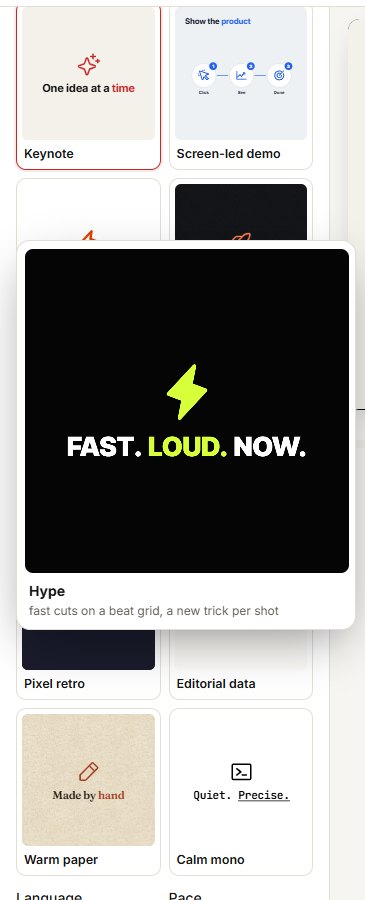
Forge Motion style cards, one enlarged and playing
Each style card is drawn by the engine; hold the pointer on one for a second to see it play.
Frames of a MarginIQ example video: a bar chart, a before-and-after, a stat grid
Frames from the MarginIQ example in Keynote: charts and numbers come from the fact sheet, by reference.
KeynoteScreen-led demoKinetic typeDark launchHypeLiquid glassPixel retroEditorial dataWarm paperCalm mono
16:99:161:14:510 to 60 seconds

What it does

The whole video, not a blank timeline

Reads your page, docs and screenshotsFacts, brand colours, logo and page images are taken from what you give it; numbers and quotes are only used when they appear in your material.
Three storyboards before you pay for the renderThree directions with their scenes; edit texts, reorder, duplicate or delete scenes and adjust timing, with a free rough preview.
Charts and data scenes from your numbersBar, line and donut charts, rankings, stat grids, tables and price cards take their values from your fact sheet by reference — the AI never types a number.
Product-at-work scenesYour screenshots become cursor clicks, scrolling pages, UI that builds itself, and photo tours with callouts.
Voice-over and captions8 voices, 6 tones, narrate or read-the-screen; the script is written to each scene’s word budget, each line voiced as its own clip and measured against its scene; burned-in captions for muted feeds.
ExportsMP4 at 30 or 60 fps, WebM with transparency, captions (.vtt) and script (.txt), rendered in your browser; the file carries an AI-generated mark in its metadata.

Pricing

What a video costs

StepStandardPremium
Read & three storyboards130–280130–280
Render & visual self-check230–280300–450
Voice-over script40–10080–200
Voice (whole video)15–4075–175
Typical voiced video420–700600–1,100
Each fix round80–190160–380

Included with Operator and Architect. Runs on the tokens your plan includes each month (10,000 on Operator, 25,000 on Architect), then on token packs.

On Operator, that is roughly 14 to 23 voiced videos a month. Premium uses the strongest models and a premium voice.

Tokens per 30–45 s video, measured on our test runs. The exact estimate for your video shows before each step; you are charged after, at its real cost.

Your material and privacy

What goes where

In your browserRendering, the automatic checks and every export. Your video file never goes through our servers.
Sent to write your videoYour page text, documents and screenshots go through the Forge gateway to the AI models (Anthropic Claude for writing; Google Gemini or ElevenLabs for voices, via OpenRouter). Your files are not stored.
Kept 90 daysYour runs — settings, storyboards, specs and scripts — in My videos, then deleted. Voice clips are not stored.
Marked as AI-generatedEvery exported file carries a machine-readable AI-generated mark in its metadata. You confirm you own or may use the URLs, files and images you give it.
Keep the tab open while a step runsA step takes up to a few minutes and the page warns you. If you close it, the step stops and the parts already done are still charged — the AI providers bill us for them.

The field

Where Forge Motion sits

  Their strength Forge Motion
HeyGen (Motion Designer) Prompt to motion graphics with a brand kit, large feature set. No extra subscription; storyboard approval before the render; automatic frame checks and fixes that touch only the flagged scenes.
Revid Reads a website URL for brand colours, fonts and logo. Also reads documents and screenshots, maps what each image shows, and keeps numbers tied to your material.
Jitter (AI) Polished motion-design editor (Pro ≈ $19 per editor per month). No design work: the whole video is built from your page; paid from plan tokens.
Hera AI motion graphics, ≈ $15–29 a month, watermarked free tier. No watermark, exact MP4 export in the browser, voice-over written to each scene’s timing.

Competitor prices from their public pages, unverified.

FAQ

Questions before you add it to your dock

Which plan do I need?

Operator or Architect. Forge Motion runs on the tokens your plan includes each month (10,000 on Operator, 25,000 on Architect) and then on token packs if you have some.

How much does a video cost?

Every paid step shows its estimate before you approve it and is charged after, at its real cost. A 30–45 second video with a voice-over typically uses 420–700 tokens on Standard and 600–1,100 on Premium. Checks, edits, previews and exports are free.

Is there a desktop app?

Yes, for Windows: install it and Forge Motion opens in its own window, signed in with your ForgeDocks account and always on the latest version. It still needs an internet connection for the AI steps; exports are saved on your computer. Windows may show a SmartScreen notice the first time because the installer is not code-signed yet — choose More info, then Run anyway.

What happens if I close the tab during a step?

Keep the tab open while a step runs (up to a few minutes); the page warns you. If you close it, the step stops and the parts already done are still charged — the AI providers bill us for them.

What happens to my page, documents and screenshots?

They are sent through the Forge gateway to the AI models to write your video and are not stored. Your runs — settings, storyboards, specs and scripts — are kept 90 days in My videos. Rendering and export happen in your browser, so the video file never goes through our servers.

Can it invent numbers or claims?

Charts and data scenes take their values from the fact sheet built from your material, by reference; the automatic checks also flag numbers and claims that are not in your material. Read the storyboard before you approve the render.

Who owns the videos?

You do, including for commercial use. Each exported file carries a machine-readable AI-generated mark in its metadata.

Which formats and languages?

16:9, 9:16, 1:1 and 4:5, from 10 to 60 seconds; MP4 at 30 or 60 fps or transparent WebM. Scripts and voices in English, French, German, Spanish, Italian, Dutch and Portuguese.

Included in your Forge plan

Give it your product page and get a branded, animated video — storyboard first, checked frame by frame, exported as an MP4 — paid from the tokens your Forge plan already includes.

Founders, small SaaS and e-commerce teams and freelancers who need product demos, explainers, ads or launch teasers a few times a month and have no motion designer.

Additional information

Version

1.0

Tool type

AI agent

Usage mode

Hosted AI app · Operator or Architect plan · Windows desktop app

Reviews

There are no reviews yet.

Be the first to review “Forge Motion”

Your email address will not be published. Required fields are marked *

— — —
??

—

—

—

Loading…
Hero image / screenshot / demo
Add a product screenshot or looping demo here — 16:9, full column width.
— —
—
Instant download after purchase
Works offline, no subscription
Lifetime license · free updates

How it works

From your page to an MP4, in five checked steps

Every paid step shows its estimate before you approve it and is charged after, at its real cost. Checks, edits, previews and exports are free.

1SetupWhat the video is for, where it will be shown, length, format, style, and your URL, docs or screenshots.Free
2Read & three storyboardsForge reads your material and proposes three storyboards — one approval, estimate shown first.≈ 130–280 tokens
3Render & checkPick a direction, edit scenes if you want, then approve the render. Automatic checks pre-select the fixes.≈ 230–280 tokens
4Voice-overOptional: a script written to each scene’s time, then voiced line by line.≈ 55–140 tokens
5ExportMP4, captions and script — free, in your browser.Free

Standard, 30–45 s video, measured on our test runs. A fix costs ≈ 80–190 tokens and changes only the scenes concerned.

Get it

Use it in your browser, or install it on Windows

Web appOpen Forge Motion on forgedocks.com and sign in with your ForgeDocks account. Nothing to install.Open Forge Motion
Windows desktop appForge Motion in its own window, outside your browser, signed in with your ForgeDocks account and always on the latest version. Needs an internet connection for the AI steps.Download for WindowsWindows 10 and 11, 64-bit · 115 MB · Windows may show a SmartScreen notice the first time because the installer is not code-signed yet: choose More info, then Run anyway. macOS later.

The difference

A chatbot writes a file. Forge Motion makes a checked video.

Raw AI chat

Write me a 30-second HTML motion-graphics video presenting my SaaS, 16:9, brand colours, end on “Start free trial”.
Here is your animation (412 lines of HTML)…
  • No MP4 — one long file
  • Timing drifts, text overflows
  • 9:16 needs a new prompt
  • Every fix is another long prompt that may break other scenes

Forge Motion

! Text too small! Too fast to readInvented factCTA unclearLogo too small / missing
  • Storyboard first, then a tested engine
  • Every frame checked; findings pre-tick the fixes
  • A fix patches only the scenes concerned
  • Exact MP4, any of 4 formats

See it

Ten styles, previewed before you pick

Forge Motion style cards, one enlarged and playing
Each style card is drawn by the engine; hold the pointer on one for a second to see it play.
Frames of a MarginIQ example video: a bar chart, a before-and-after, a stat grid
Frames from the MarginIQ example in Keynote: charts and numbers come from the fact sheet, by reference.
KeynoteScreen-led demoKinetic typeDark launchHypeLiquid glassPixel retroEditorial dataWarm paperCalm mono
16:99:161:14:510 to 60 seconds

What it does

The whole video, not a blank timeline

Reads your page, docs and screenshotsFacts, brand colours, logo and page images are taken from what you give it; numbers and quotes are only used when they appear in your material.
Three storyboards before you pay for the renderThree directions with their scenes; edit texts, reorder, duplicate or delete scenes and adjust timing, with a free rough preview.
Charts and data scenes from your numbersBar, line and donut charts, rankings, stat grids, tables and price cards take their values from your fact sheet by reference — the AI never types a number.
Product-at-work scenesYour screenshots become cursor clicks, scrolling pages, UI that builds itself, and photo tours with callouts.
Voice-over and captions8 voices, 6 tones, narrate or read-the-screen; the script is written to each scene’s word budget, each line voiced as its own clip and measured against its scene; burned-in captions for muted feeds.
ExportsMP4 at 30 or 60 fps, WebM with transparency, captions (.vtt) and script (.txt), rendered in your browser; the file carries an AI-generated mark in its metadata.

Pricing

What a video costs

StepStandardPremium
Read & three storyboards130–280130–280
Render & visual self-check230–280300–450
Voice-over script40–10080–200
Voice (whole video)15–4075–175
Typical voiced video420–700600–1,100
Each fix round80–190160–380

Included with Operator and Architect. Runs on the tokens your plan includes each month (10,000 on Operator, 25,000 on Architect), then on token packs.

On Operator, that is roughly 14 to 23 voiced videos a month. Premium uses the strongest models and a premium voice.

Tokens per 30–45 s video, measured on our test runs. The exact estimate for your video shows before each step; you are charged after, at its real cost.

Your material and privacy

What goes where

In your browserRendering, the automatic checks and every export. Your video file never goes through our servers.
Sent to write your videoYour page text, documents and screenshots go through the Forge gateway to the AI models (Anthropic Claude for writing; Google Gemini or ElevenLabs for voices, via OpenRouter). Your files are not stored.
Kept 90 daysYour runs — settings, storyboards, specs and scripts — in My videos, then deleted. Voice clips are not stored.
Marked as AI-generatedEvery exported file carries a machine-readable AI-generated mark in its metadata. You confirm you own or may use the URLs, files and images you give it.
Keep the tab open while a step runsA step takes up to a few minutes and the page warns you. If you close it, the step stops and the parts already done are still charged — the AI providers bill us for them.

The field

Where Forge Motion sits

  Their strength Forge Motion
HeyGen (Motion Designer) Prompt to motion graphics with a brand kit, large feature set. No extra subscription; storyboard approval before the render; automatic frame checks and fixes that touch only the flagged scenes.
Revid Reads a website URL for brand colours, fonts and logo. Also reads documents and screenshots, maps what each image shows, and keeps numbers tied to your material.
Jitter (AI) Polished motion-design editor (Pro ≈ $19 per editor per month). No design work: the whole video is built from your page; paid from plan tokens.
Hera AI motion graphics, ≈ $15–29 a month, watermarked free tier. No watermark, exact MP4 export in the browser, voice-over written to each scene’s timing.

Competitor prices from their public pages, unverified.

FAQ

Questions before you add it to your dock

Which plan do I need?

Operator or Architect. Forge Motion runs on the tokens your plan includes each month (10,000 on Operator, 25,000 on Architect) and then on token packs if you have some.

How much does a video cost?

Every paid step shows its estimate before you approve it and is charged after, at its real cost. A 30–45 second video with a voice-over typically uses 420–700 tokens on Standard and 600–1,100 on Premium. Checks, edits, previews and exports are free.

Is there a desktop app?

Yes, for Windows: install it and Forge Motion opens in its own window, signed in with your ForgeDocks account and always on the latest version. It still needs an internet connection for the AI steps; exports are saved on your computer. Windows may show a SmartScreen notice the first time because the installer is not code-signed yet — choose More info, then Run anyway.

What happens if I close the tab during a step?

Keep the tab open while a step runs (up to a few minutes); the page warns you. If you close it, the step stops and the parts already done are still charged — the AI providers bill us for them.

What happens to my page, documents and screenshots?

They are sent through the Forge gateway to the AI models to write your video and are not stored. Your runs — settings, storyboards, specs and scripts — are kept 90 days in My videos. Rendering and export happen in your browser, so the video file never goes through our servers.

Can it invent numbers or claims?

Charts and data scenes take their values from the fact sheet built from your material, by reference; the automatic checks also flag numbers and claims that are not in your material. Read the storyboard before you approve the render.

Who owns the videos?

You do, including for commercial use. Each exported file carries a machine-readable AI-generated mark in its metadata.

Which formats and languages?

16:9, 9:16, 1:1 and 4:5, from 10 to 60 seconds; MP4 at 30 or 60 fps or transparent WebM. Scripts and voices in English, French, German, Spanish, Italian, Dutch and Portuguese.

Included in your Forge plan

Give it your product page and get a branded, animated video — storyboard first, checked frame by frame, exported as an MP4 — paid from the tokens your Forge plan already includes.

Founders, small SaaS and e-commerce teams and freelancers who need product demos, explainers, ads or launch teasers a few times a month and have no motion designer.

Downloads

Files unlock after purchase

Buy the license to download the latest build and every prior version.

Related tools