0,00 €

Reorder points, safety stock and cash-in-stock for your whole catalogue — import your store export or the StockIQ template. Runs offline, yours to keep.

Stockiq icon

Description

The decision

Stock is a cycle, not a number

Every SKU falls, gets reordered, and rises again. StockIQ reads that cycle for your whole catalogue — where the reorder line sits, how much buffer rides out the wobble, and what it all ties up in cash.

Reorder point

Order the moment stock crosses this line.

Safety stock

The buffer that rides out demand & lead-time wobble.

Days of cover

How long today’s stock lasts at your demand.

Cash in stock

What all that inventory ties up — the shaded area.

What makes it different

Your whole catalogue, not one SKU at a time

Catalogue import

Drop your store export — it does the typing

Shopify, WooCommerce, Etsy, eBay, Square and Amazon exports are auto-mapped into a column map you can check and fix, so it never silently reads the wrong column. Dated orders become real demand and its variability.

  • Products + orders export, or the one-file StockIQ template
  • File import — never a store connection, fully offline
  • On-hand drives days of cover + “Reorder now” flags
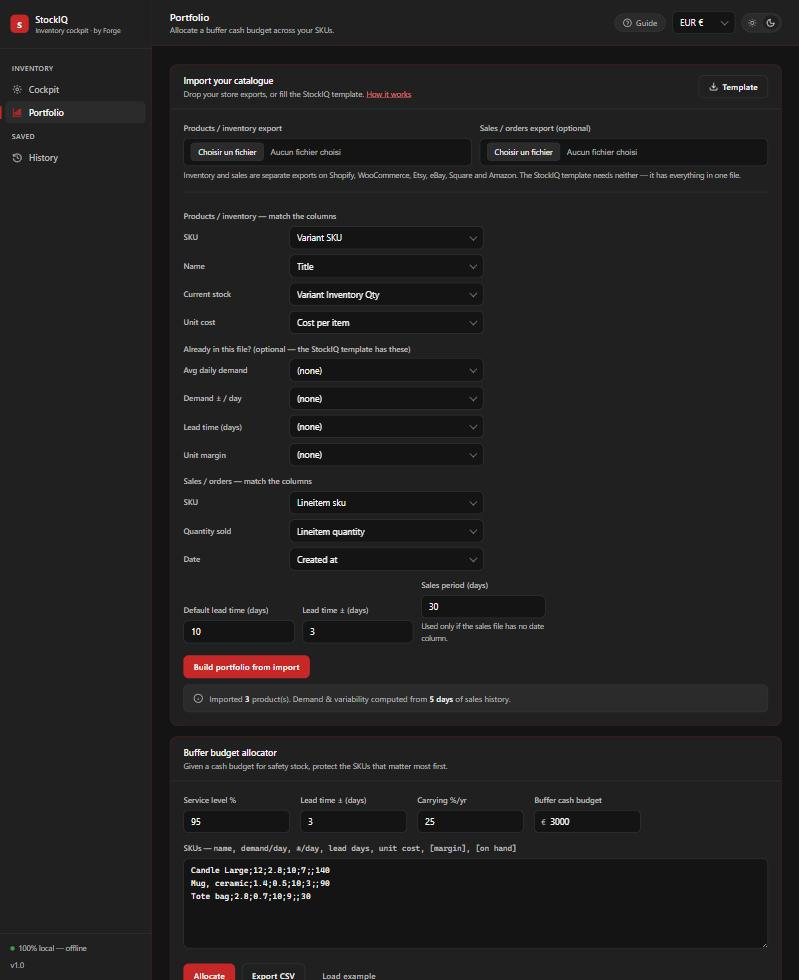
Catalogue import with editable column map

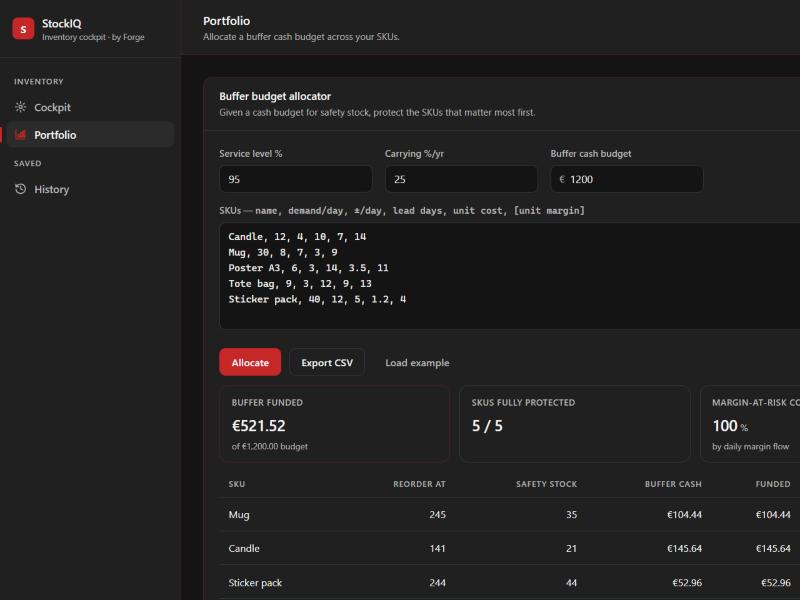
Buffer budget allocator

Spend your buffer cash where it protects the most

Give StockIQ a cash budget for safety stock and it funds the SKUs with the most daily margin-at-risk first — showing each as Protected, Partial or Unfunded, and the share of risk you’ve covered.

  • Ranks the catalogue by what hurts most to run out of
  • See exactly how far a fixed amount of working capital goes
  • Export the plan to CSV
Buffer budget allocator

Also in StockIQ
Service level (fill rate)95.0%
Z-score 1.65 · chance a cycle doesn’t stock out
Holding €110Stockout €154
Lowest total cost ≈ 99% service for this product.

Service level ↔ cash

A live slider that balances buffer cash against stockout cost and names the sweet spot.

Order qty (EOQ)316units
Orders / year13.8
Annual holding€386.69
Order value (EOQ)€2,214.66
SaveReset

Order economics

EOQ, orders per year and annual holding cost — how much to buy each time.

SavedServiceReorderSafetyCash
Candle95.0%18363€1,547
Mug95.0%362152€1,602
Poster A395.0%11935€675

Local history

Save products and revisit past runs — stored only in your browser.

EUR €
USD $
GBP £
CHF
CAD C$
AUD A$

Six currencies

Display in EUR, USD, GBP, CHF, CAD or AUD.

SKUReorderOn handStatus
Candle183140Reorder now
Mug362520Reorder soon
Poster A3119300In stock

Reorder-now flags

Everything at or below its reorder point, flagged across the catalogue.

Assumptions — editable
Unit margin€ 14
Order cost€ 20
Carrying cost / year25 %
Standard 25%Perishable 35%Digital/low 15%

Editable presets

Carrying-cost and service-level defaults you can tune to your business.

Own vs rent

Why StockIQ

Free calculators answer one SKU at a time; inventory SaaS wants a monthly fee and your store connected; a chatbot guesses the numbers. StockIQ imports the whole catalogue, shows the money, and stays offline.

  StockIQ Free calculators Inventory SaaS
Whole catalogue from a store export ✓ — ✓*
Cash in stock + buffer-budget allocation ✓ — partial
Service-level ↔ cash trade-off, live ✓ — —
Runs offline · no store connection ✓ ✓ —
Price Free, yours Free $20+/mo

* SaaS requires connecting your store and a subscription.

How it works

From export to decision in minutes

01

Import your catalogue (products + orders export, or the StockIQ template) — or type one product in the Cockpit.

02

Read the restock decision instantly: reorder point, safety stock, days of cover, cash in stock.

03

Tune the service level and watch buffer cash vs stockout cost balance to the sweet spot.

04

Set a buffer budget and let the Portfolio protect the highest-risk SKUs first.

Questions

Before you download

Does StockIQ connect to my store?

No. You export a file from your platform and StockIQ reads it locally — a file import, never a store connection. Nothing is sent to a server and it works offline.

Which platforms can I import from?

Shopify, WooCommerce, Etsy, eBay, Square and Amazon exports are auto-mapped, and any other CSV works through the editable column map or the StockIQ template.

My export doesn’t include cost — is that a problem?

Only Square and Shopify (with cost-tracking) export unit cost. For the others, add cost in the StockIQ template or map a cost column — everything else still imports.

Do I need an account or install?

No. It’s a single HTML file — open it in any browser, no install, no account, works offline.

Do I get updates?

Yes — updates are free; re-download the latest file when a new version ships.

Own your inventory maths, not a subscription.

For multi-channel sellers managing 20–500 SKUs. A single file. Your data never leaves your browser.

Get StockIQ free

Additional information

Version

1.1

Tool type

HTML tool

Reviews

There are no reviews yet.

Be the first to review “StockIQ”

Your email address will not be published. Required fields are marked *

— — —
??

—

—

—

Loading…
Hero image / screenshot / demo
Add a product screenshot or looping demo here — 16:9, full column width.
— —
—
Instant download after purchase
Works offline, no subscription
Lifetime license · free updates

The decision

Stock is a cycle, not a number

Every SKU falls, gets reordered, and rises again. StockIQ reads that cycle for your whole catalogue — where the reorder line sits, how much buffer rides out the wobble, and what it all ties up in cash.

Reorder point

Order the moment stock crosses this line.

Safety stock

The buffer that rides out demand & lead-time wobble.

Days of cover

How long today’s stock lasts at your demand.

Cash in stock

What all that inventory ties up — the shaded area.

What makes it different

Your whole catalogue, not one SKU at a time

Catalogue import

Drop your store export — it does the typing

Shopify, WooCommerce, Etsy, eBay, Square and Amazon exports are auto-mapped into a column map you can check and fix, so it never silently reads the wrong column. Dated orders become real demand and its variability.

  • Products + orders export, or the one-file StockIQ template
  • File import — never a store connection, fully offline
  • On-hand drives days of cover + “Reorder now” flags
Catalogue import with editable column map

Buffer budget allocator

Spend your buffer cash where it protects the most

Give StockIQ a cash budget for safety stock and it funds the SKUs with the most daily margin-at-risk first — showing each as Protected, Partial or Unfunded, and the share of risk you’ve covered.

  • Ranks the catalogue by what hurts most to run out of
  • See exactly how far a fixed amount of working capital goes
  • Export the plan to CSV
Buffer budget allocator

Also in StockIQ
Service level (fill rate)95.0%
Z-score 1.65 · chance a cycle doesn’t stock out
Holding €110Stockout €154
Lowest total cost ≈ 99% service for this product.

Service level ↔ cash

A live slider that balances buffer cash against stockout cost and names the sweet spot.

Order qty (EOQ)316units
Orders / year13.8
Annual holding€386.69
Order value (EOQ)€2,214.66
SaveReset

Order economics

EOQ, orders per year and annual holding cost — how much to buy each time.

SavedServiceReorderSafetyCash
Candle95.0%18363€1,547
Mug95.0%362152€1,602
Poster A395.0%11935€675

Local history

Save products and revisit past runs — stored only in your browser.

EUR €
USD $
GBP £
CHF
CAD C$
AUD A$

Six currencies

Display in EUR, USD, GBP, CHF, CAD or AUD.

SKUReorderOn handStatus
Candle183140Reorder now
Mug362520Reorder soon
Poster A3119300In stock

Reorder-now flags

Everything at or below its reorder point, flagged across the catalogue.

Assumptions — editable
Unit margin€ 14
Order cost€ 20
Carrying cost / year25 %
Standard 25%Perishable 35%Digital/low 15%

Editable presets

Carrying-cost and service-level defaults you can tune to your business.

Own vs rent

Why StockIQ

Free calculators answer one SKU at a time; inventory SaaS wants a monthly fee and your store connected; a chatbot guesses the numbers. StockIQ imports the whole catalogue, shows the money, and stays offline.

  StockIQ Free calculators Inventory SaaS
Whole catalogue from a store export ✓ — ✓*
Cash in stock + buffer-budget allocation ✓ — partial
Service-level ↔ cash trade-off, live ✓ — —
Runs offline · no store connection ✓ ✓ —
Price Free, yours Free $20+/mo

* SaaS requires connecting your store and a subscription.

How it works

From export to decision in minutes

01

Import your catalogue (products + orders export, or the StockIQ template) — or type one product in the Cockpit.

02

Read the restock decision instantly: reorder point, safety stock, days of cover, cash in stock.

03

Tune the service level and watch buffer cash vs stockout cost balance to the sweet spot.

04

Set a buffer budget and let the Portfolio protect the highest-risk SKUs first.

Questions

Before you download

Does StockIQ connect to my store?

No. You export a file from your platform and StockIQ reads it locally — a file import, never a store connection. Nothing is sent to a server and it works offline.

Which platforms can I import from?

Shopify, WooCommerce, Etsy, eBay, Square and Amazon exports are auto-mapped, and any other CSV works through the editable column map or the StockIQ template.

My export doesn’t include cost — is that a problem?

Only Square and Shopify (with cost-tracking) export unit cost. For the others, add cost in the StockIQ template or map a cost column — everything else still imports.

Do I need an account or install?

No. It’s a single HTML file — open it in any browser, no install, no account, works offline.

Do I get updates?

Yes — updates are free; re-download the latest file when a new version ships.

Own your inventory maths, not a subscription.

For multi-channel sellers managing 20–500 SKUs. A single file. Your data never leaves your browser.

Get StockIQ free

Downloads

Files unlock after purchase

Buy the license to download the latest build and every prior version.

Related tools